
Identity documents (AUS)
Reference for the structured identityDocuments array on Australian individual verifications. Each item is one identity document. The shape varies by kind.
Include identityDocuments directly in the POST /v5/verifications request body.
Common shape
identityDocuments item
{
	"kind": "driverLicence" | "passport" | "medicareCard" | "attachment",
	// ...kind-specific fields
}
kind is a discriminator. Each value below shows the fields for that document type.
identityDocuments carries the structured data for each document (number, state, expiry, etc.). The optional file upload (front/back image, scan) is sent separately in the top-level documents array as a kind: "attachment" upload.Driver licence
{
	"kind": "driverLicence",
	"number": "12345678",
	"cardNumber": "1234567890",
	"state": "NSW"
}
| Field | Type | Required | Description |
|---|---|---|---|
kind | string | Yes | Must be "driverLicence". |
number | string | Yes | Driver licence number. Format depends on state. See below. |
cardNumber | string | Yes | Card number printed on the licence. Format depends on state. |
state | string | Yes | One of ACT, NSW, NT, QLD, SA, TAS, VIC, WA. Case-insensitive. |
Per-state validation
The licence and card number formats differ by issuing state. The rules below are enforced server-side.
| State | Licence number | Card number |
|---|---|---|
ACT | 1–10 digits | exactly 10 alphanumeric characters |
NSW | 6–8 alphanumeric characters | exactly 10 digits |
NT | 1–10 digits | 6–8 digits |
QLD | 8–9 digits | exactly 10 alphanumeric characters |
SA | exactly 6 alphanumeric characters | exactly 9 alphanumeric characters |
TAS | 6–8 alphanumeric characters | exactly 9 alphanumeric characters |
VIC | 1–10 digits | exactly 8 alphanumeric characters |
WA | exactly 7 digits | 8–10 alphanumeric characters |
state value is uppercased before validation, so lowercase values like "vic" are accepted.Where to find these on your licence
Licence layouts vary by state. The descriptions below match the helper popovers shown in the bronID portal — re-use the wording on your own data-collection screen so the customer knows exactly what to enter.
ACT
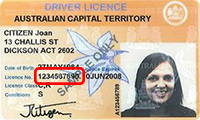
Licence number — the 10-digit number that appears below the date of birth.
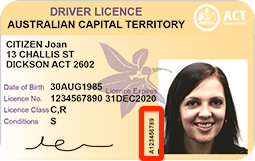
Card number — the string of 10 letters and numbers that appears vertically between the signature and the licence photo. The card number only appears on licences issued after January 2014. If the card was issued before January 2014 (or has no card number), enter ten zeroes (0000000000).
NSW
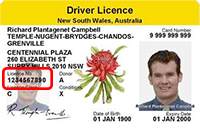
Licence number — the 6–8 digit number that appears below the address.
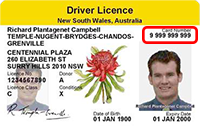
Card number — the 10-digit number that appears to the right of the name, above the licence photo.
NT
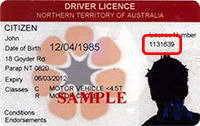
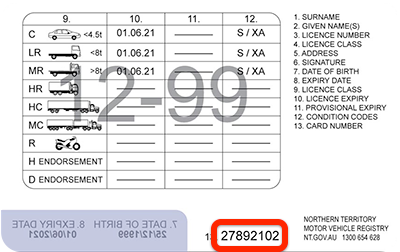
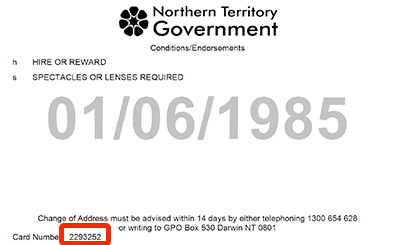
NT redesigned the card in November 2020. Both formats are still in circulation.
Licence number — issued after 1 November 2020. Appears below the given name and above the address.
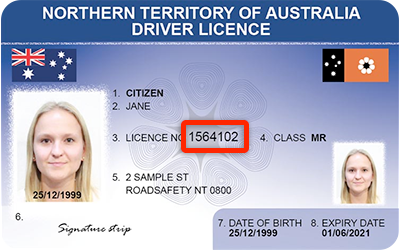
Licence number — issued before 1 November 2020. The 7-digit number that appears towards the top-right of the card.
Card number — issued after 1 November 2020. The 6–8 digit number on the back of the card at the bottom.
Card number — issued before 1 November 2020. The 6–8 digit number on the back of the card in the bottom-left corner.
QLD
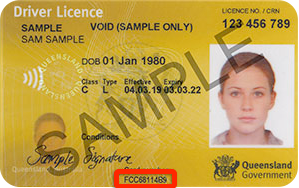
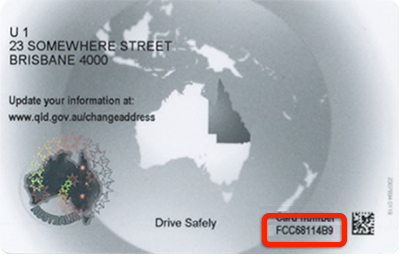
The card number is printed on the front and the back of the QLD licence; either is accepted.
Licence number — the 8–9 digit number that appears at the top-right of the card.
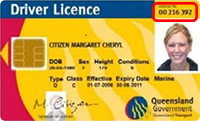
Card number (front) — the string of 10 letters and numbers, printed on the front of the card.
Card number (back) — the same 10-character string, printed on the back of the card.
SA
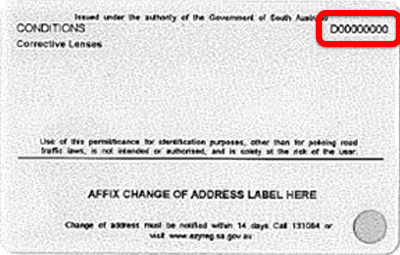
Licence number — the string of letters and numbers towards the top-left of the card.
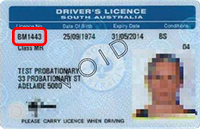
Card number — the string of 9 letters and numbers that appears on the back of the card in the top-right corner.
TAS
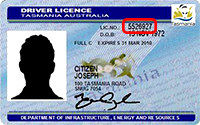
Licence number — the 8-digit number that appears towards the top-right of the card.
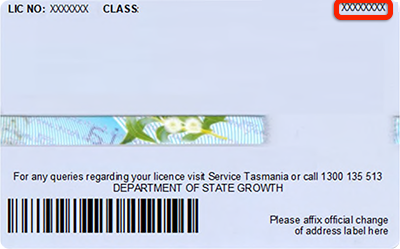
Card number — the string of 9 letters and numbers that appears on the back of the card in the top-right corner.
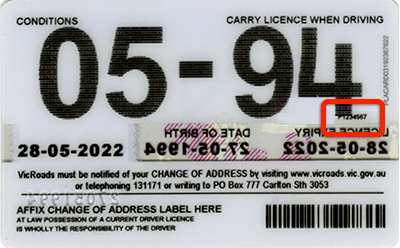
VIC
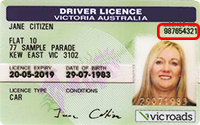
Licence number — the 9-digit number that appears towards the top-right of the card.
Card number — the string of 9 letters and numbers on the back of the card on the right-hand side at the middle of the card.
WA
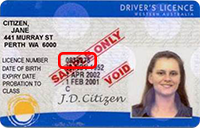
Licence number — the 7-digit number that appears towards the centre of the card, just below the address.
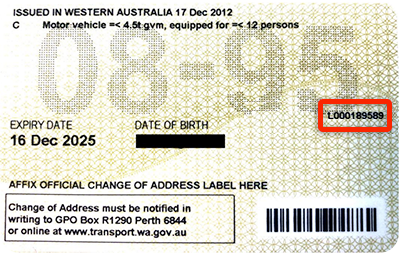
Card number — the string of 8–10 letters and numbers that appears on the back of the card on the right side.
Passport
{
	"kind": "passport",
	"number": "PA1234567",
	"countryOfIssue": "AUS"
}
| Field | Type | Required | Description |
|---|---|---|---|
kind | string | Yes | Must be "passport". |
number | string | Yes | Passport number. Format depends on countryOfIssue — see below. |
countryOfIssue | string | Yes | ISO3 country code. See Countries. |
Passport number validation
| Country of issue | Format |
|---|---|
AUS | 1 or 2 letters followed by 7 digits |
NZL | 1 or 2 letters followed by 6 digits |
| All other countries | 1–14 alphanumeric characters |
Medicare card
{
	"kind": "medicareCard",
	"colour": "green",
	"number": "2123456701",
	"individualReferenceNumber": "1",
	"expiryDate": "12/2030",
	"nameOnCard": "JANE A CITIZEN"
}
| Field | Type | Required | Description |
|---|---|---|---|
kind | string | Yes | Must be "medicareCard". |
colour | string | Yes | One of green, blue, yellow. Case-insensitive. |
number | string | Yes | 10 digits. Must satisfy the Services Australia checksum (see below). |
individualReferenceNumber | string | Yes | Single digit identifying the family member on a shared card. |
expiryDate | string | Yes | Format depends on colour. See below. |
nameOnCard | string | Yes | Cardholder's name exactly as shown on the card. |
Card number checksum
Medicare card numbers are 10 digits: an 8-digit base, a check digit, and a sequence digit. The check digit is computed from the base using weights [1, 3, 7, 9, 1, 3, 7, 9]:
sum  = d1*1 + d2*3 + d3*7 + d4*9 + d5*1 + d6*3 + d7*7 + d8*9
check = sum mod 10
For card number 2123 4567 01, the base is 21234567, the check digit is 0, and the sequence digit is 1. The first base digit must be in the range 2–6.
Expiry-date format
| Colour | Format | Notes |
|---|---|---|
green | MM/YYYY | Treated as the last day of that month. |
blue / yellow | DD/MM/YY | The two-digit year is interpreted as 20YY. |
The expiry date must be in the future at submission time.
Attachment
A free-form document upload not tied to a regulated identifier. Use this when none of the structured kinds apply, or to attach a supporting document with arbitrary description text.
{
	"kind": "attachment",
	"description": "Utility bill — Origin Energy, Mar 2026"
}
| Field | Type | Required | Description |
|---|---|---|---|
kind | string | Yes | Must be "attachment". |
description | string | No | Free-form description. Empty allowed. |
The actual file goes in the top-level documents array. See Include documents.
Consent
Every subType: "data" submission requires top-level consent: true. The customer must have agreed to the declaration below before you submit the request — display this text next to the consent checkbox on the page where you collect the customer's details:
I confirm that I am authorised to provide the personal details presented in this form, and I consent to this information being checked with the appropriate document issuers, official record holders, credit bureaus, and mobile providers, including superannuation and employment verification, or other third-party systems via bronID (an Identity Service Provider), for the purposes of identity verification and AML/CTF compliance. I consent to the details and results from this identity verification being stored for audit and compliance purposes with the Identity Service Provider (bronID).
{
	"country": "AUS",
	"type": "individual",
	"subType": "data",
	"consent": true
}
See Verify an individual (data) for the full request body shape.
Test values (Development environment only)
In the development environment the values below short-circuit format validation and return a verified outcome. They do not apply in production.
| Field | Value |
|---|---|
| Driver licence number | 11111111 |
| Passport number | A1111111 |
| Medicare card number | 2111111111 |
See Test values for the full list.